Console guide
How the Tapsi Cloud console is laid out, and the patterns every page shares.
Layout
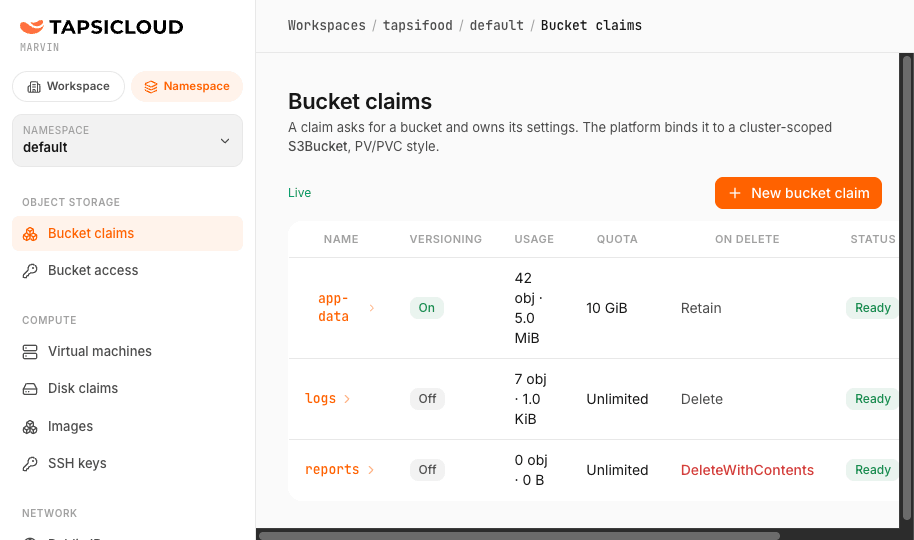
- Workspace: your organization. Switch it at the bottom of the sidebar; the icon beside it opens the kubectl dialog.
- Workspace / Namespace scope: the sidebar shows one scope at a time. Workspace holds what the organization shares (VPCs, buckets, members, billing, disks, public IPs); Namespace holds one project’s workloads.
- Namespace switcher: switching keeps you on the same page in the other namespace.
- The menu follows your permissions; a button you cannot use is disabled with the reason on hover.
- Breadcrumb: Workspaces / <workspace> / <namespace> / <page> / <object>
Shared patterns
| Pattern | Behavior |
|---|---|
| Live lists | Update without reloading; a Live marker shows the stream is connected. |
| Status | Green Ready / Running / Bound, amber Pending / Provisioning, red Error / Failed, grey Halted / Released. |
| Create | The new row appears at once as Pending; if something blocks it, it turns red with the reason. |
| YAML | Every row has a YAML action showing the exact manifest, so you can repeat it with kubectl apply. |
| Delete | Asks for confirmation; destructive deletes ask you to type the name. Deletes that would break something are refused with the reason. |
Common tasks
| I want to… | Where |
|---|---|
| Invite a colleague | IAM → Workspace members → Add member |
| Store files for an app | Object storage → Bucket claims → Create claim, then Bucket access |
| Launch a server | Compute → Virtual machines → Create virtual machine |
| Expose a server to the internet | Machine → Network → Assign public IP, then Firewall |
| Grow a disk | Disk claims → claim → grow (grow only) |
| See this month’s cost | Billing → Overview |