Bucket access
Bucket access is how you get credentials and an identity for one or more bucket claims in this namespace. Each access creates one identity and one Secret — even if it covers several buckets — so an application connects with a single key pair.
You can only select claims in this namespace. For public access or access from another namespace, use the bucket policy on the claim itself.
Create at least one bucket claim in the same namespace first. Without a claim, the create form has nothing to grant.
Access modes
| In the console | In YAML (accessMode) | Meaning |
|---|---|---|
| Read only | ReadOnly | List the bucket and read objects |
| Read / write | ReadWrite | Read, write, and delete objects |
| Read / write + publish objects | ReadWritePublish | Same as ReadWrite, plus making individual objects public via ACL |
None of these modes grant bucket administration: deleting the bucket, changing its policy, versioning, lifecycle, or quota is never included.
ReadWritePublish can expose an object to anonymous readers. If the app only needs upload/download, use ReadWrite.
Create from the console
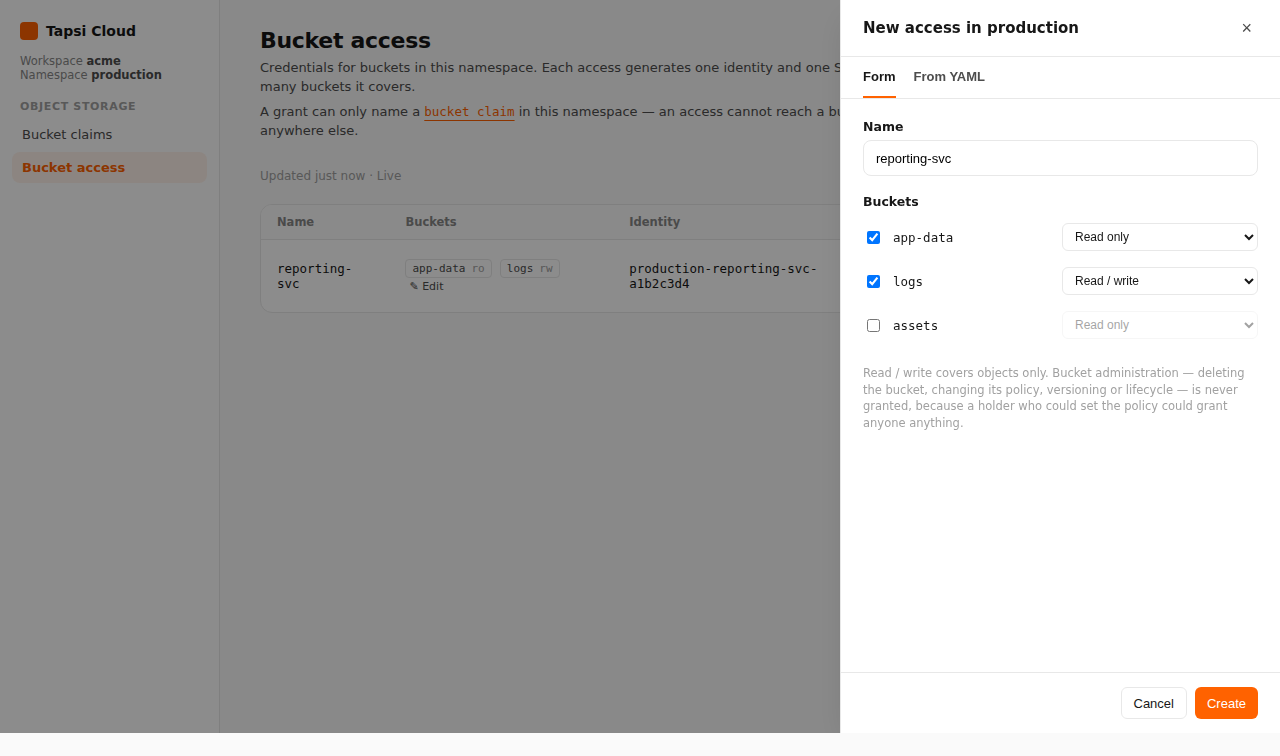
- Open your workspace, then open a namespace.
- In the namespace nav, under Object Storage, open Bucket access.
- Click New access.
- In the panel (tab Form):
- Fill in Name (for example
reporting-svc) — it cannot be changed later. - Under Buckets, check the claims you need and pick a mode for each.
- Fill in Name (for example
- Click Create.
- Wait until the access status is Ready.
- In the Credentials column, click Reveal to see
AWS_ACCESS_KEY_ID,AWS_SECRET_ACCESS_KEY, andAWS_ENDPOINT_URL.
To create from YAML in the same panel, open the From YAML tab.
Create with kubectl
Apply an S3BucketAccess in the same namespace:
❯ kubectl -n <namespace> apply -f - <<EOF❯ apiVersion: oss.tapsicloud.com/v1alpha1❯ kind: S3BucketAccess❯ metadata:❯ name: reporting-svc❯ spec:❯ buckets:❯ - bucketClaimName: app-data❯ accessMode: ReadOnly❯ - bucketClaimName: logs❯ accessMode: ReadWrite# secretName: reporting-svc-credentials # optional; default: <name>-credentials❯ EOF
Replace <namespace> with your namespace. Assumes your workspace kubeconfig and context are already configured. Each bucketClaimName must be a claim in this namespace.
Check status:
❯ kubectl -n <namespace> get s3bucketaccesses reporting-svc
When Phase is Ready, credentials are in the Secret:
❯ kubectl -n <namespace> \get secret reporting-svc-credentials -o jsonpath='{.data}'
Usual Secret keys: AWS_ACCESS_KEY_ID, AWS_SECRET_ACCESS_KEY, AWS_ENDPOINT_URL (base64-encoded values).
After creation
| Action | In the console | Meaning |
|---|---|---|
| View keys | Reveal / Hide | Read the Secret; needs get on secrets |
| Rotate keys | Rotate | New key is issued; the old one stops working immediately |
| Change buckets | Edit on the Buckets column | Add/remove claims or change modes — without rotating keys |
| Delete | Delete the row | Identity and credentials are removed; clients using that key break |
Rotate with kubectl:
❯ kubectl -n <namespace> \annotate s3bucketaccess reporting-svc \oss.tapsicloud.com/rotate-keys="$(date -u +%FT%TZ)" --overwrite
While an access still grants a claim, deleting that claim is refused. Edit or delete the access first, then delete the claim.
Editing the bucket list does not rotate credentials. Only Rotate or Delete invalidates the current key.