Bucket claim lifecycle
Lifecycle rules are standing orders that automatically delete data — for example old objects under a prefix, superseded versions, or unfinished uploads. You set them on the bucket claim in a namespace — from the console or with kubectl.
Every rule here deletes data. Deletion is asynchronous, runs on a background schedule, and also applies to objects uploaded later. Claim status does not report what a rule removed.
If you leave lifecycle unset, objects stay until you (or the claim deletion policy) delete them.
Set from the console
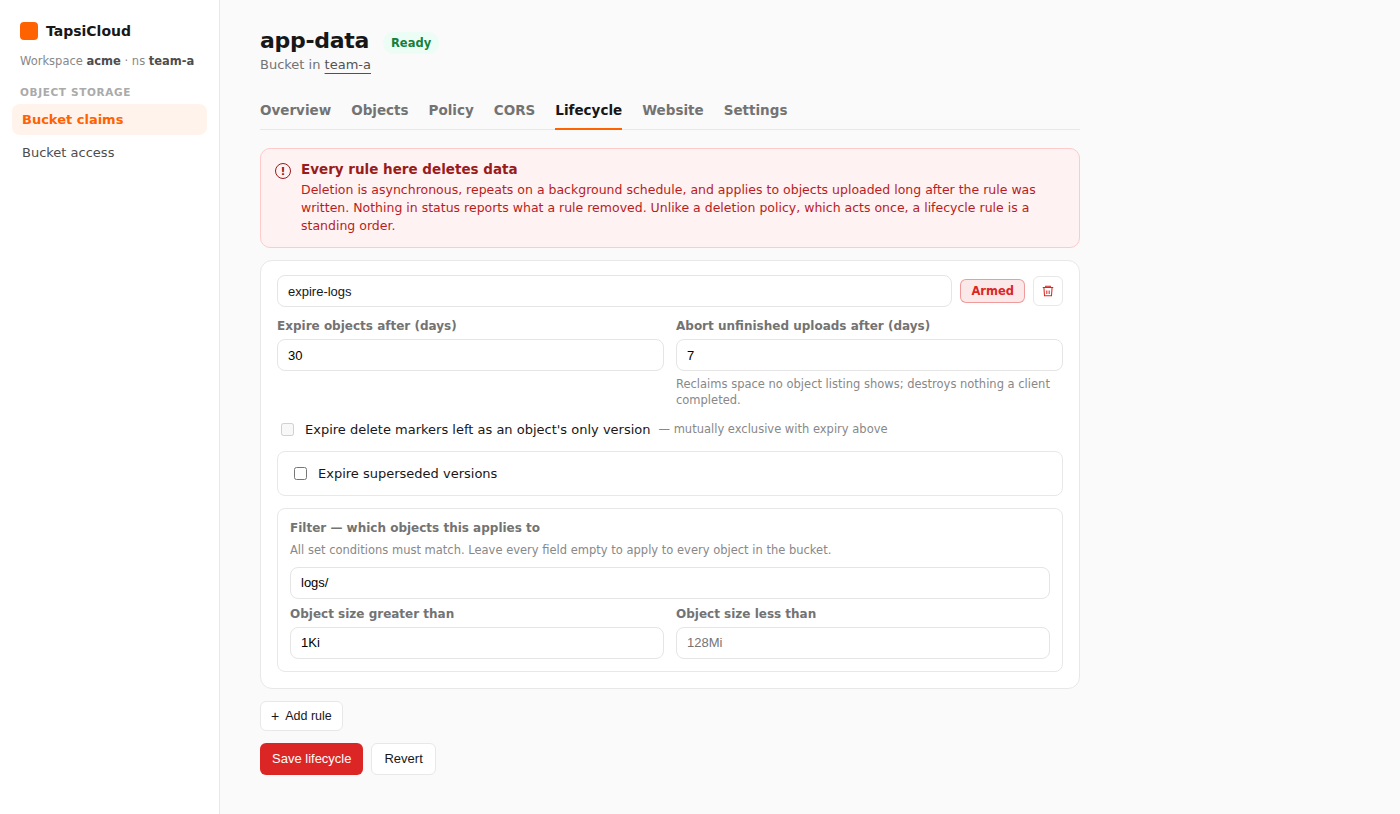
- Open your workspace, then open a namespace.
- In the namespace nav, under Object Storage, open Bucket claims.
- Open the claim.
- Select the Lifecycle tab.
- Click Add rule and fill in:
- rule name — unique name for the rule (required)
- Armed / Disabled — the rule runs only when Armed
- Expire objects after (days) — delete objects N days after creation
- Abort unfinished uploads after (days) (optional) — abort incomplete multipart uploads
- Expire delete markers… or Expire superseded versions if needed (usually on a versioned bucket)
- Filter (optional) — for example prefix
logs/or a size limit
- Click Save lifecycle.
Remove lifecycle
Delete every rule, then click Save lifecycle again to remove the configuration from the bucket.
Set with kubectl
Set spec.lifecyclePolicy on the same S3BucketClaim:
❯ kubectl -n <namespace> apply -f - <<EOF❯ apiVersion: oss.tapsicloud.com/v1alpha1❯ kind: S3BucketClaim❯ metadata:❯ name: app-data❯ spec:❯ lifecyclePolicy:❯ - name: expire-logs❯ enabled: true❯ filter:❯ prefix: logs/❯ expireAfterDays: 30❯ abortIncompleteMultipartUploadAfterDays: 7❯ EOF
Replace <namespace> with your namespace. Assumes your workspace kubeconfig and context are already configured.
Multiple rules (versions and a disabled rule)
1apiVersion: oss.tapsicloud.com/v1alpha12kind: S3BucketClaim3metadata:4 name: app-data5spec:6 lifecyclePolicy:7 - name: expire-logs8 enabled: true9 filter:10 prefix: logs/11 tags:12 - key: class13 value: transient14 objectSizeGreaterThan: 1Ki15 expireAfterDays: 3016 abortIncompleteMultipartUploadAfterDays: 717 - name: trim-versions18 enabled: true19 noncurrentVersions:20 expireAfterDays: 1421 keepNewest: 322 - name: parked23 enabled: false24 filter:25 prefix: tmp/26 expireAfterDays: 1
Rule fields
| Field | In plain terms |
|---|---|
name | Unique rule id |
enabled | true = armed; false = stored but inactive |
filter (optional) | Scope; omit = every object |
filter.prefix | Key prefix |
filter.tags | Tags that must match |
filter.objectSizeGreaterThan / objectSizeLessThan | Size bounds (for example 1Ki, 128Mi) |
expireAfterDays | Delete objects N days after creation |
expireDeleteMarkers | Remove orphan delete markers (not with expireAfterDays) |
noncurrentVersions | Expire old versions on a versioned bucket |
abortIncompleteMultipartUploadAfterDays | Abort unfinished multipart uploads |
expireAfterDays and expireDeleteMarkers cannot be set on the same rule. Noncurrent or delete-marker rules on an unversioned bucket are accepted but do not run.
On a versioned bucket, expireAfterDays usually expires the current version by adding a delete marker. Use noncurrentVersions to remove older versions.
Clear lifecycle
❯ kubectl -n <namespace> patch s3bucketclaim app-data --type=merge -p '{"spec":{"lifecyclePolicy":null}}'