Bucket claim objects
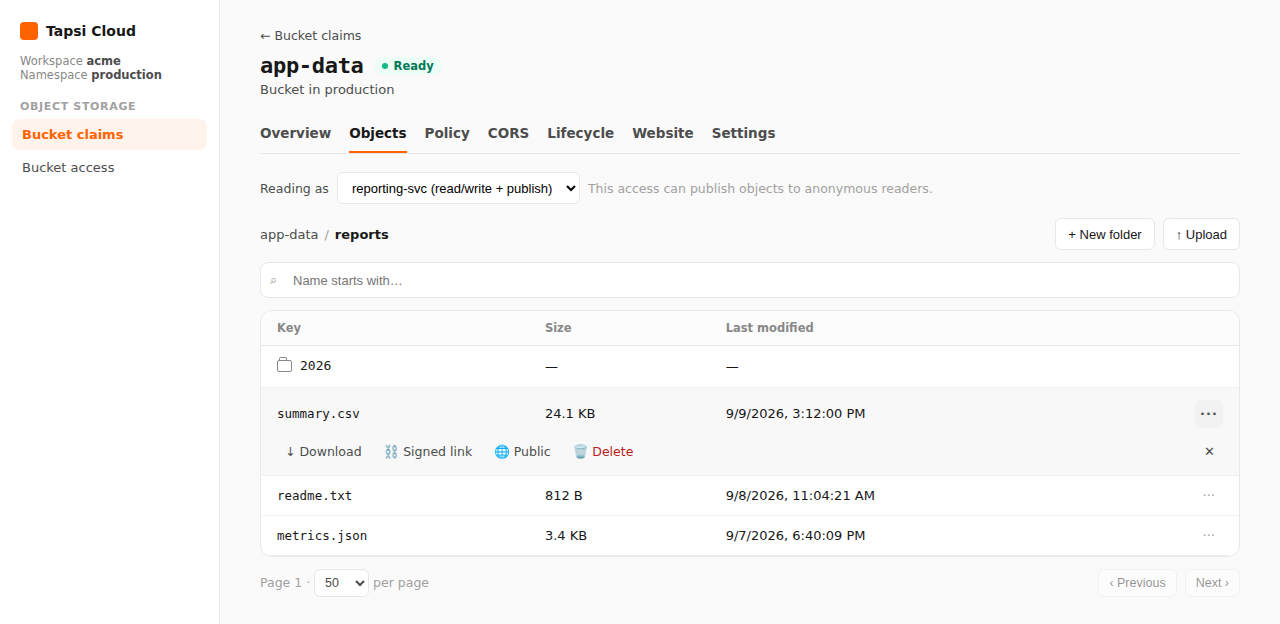
The Objects tab shows what is in the bucket in the console: folders and files, uploads, and per-object actions. The browser connects through an existing Bucket access in the same namespace — it does not mint keys just by opening the tab.
Without a Bucket access that covers this claim, the Objects tab shows No access grant covers this bucket. Upload and delete need at least Read / write on that access.
Open the Objects tab
- Open your workspace, then open a namespace.
- Under Object Storage → Bucket claims, open the claim.
- Select the Objects tab.
- Under Reading as, pick which access to use (if more than one covers this bucket).
| Access mode | What you can do in the browser |
|---|---|
| Read only | List, download, signed link |
| Read / write | Above, plus upload, new folder, delete |
| Read / write + publish | Above, plus make an object public/private and copy a public link |
With Read only, a note next to the selector says uploads and deletes need a ReadWrite access.
Browse the object list
In the Objects tab you can:
- See folders and files in a table (Key, Size, Last modified)
- Open a folder by clicking it; use the breadcrumb to go back
- Filter with Name starts with… (prefix only — not substring search)
- Page through results (25 / 50 / 100 per page)
An empty bucket shows No objects. With a writable access you can upload files or create a folder.
Upload and folders (writable access)
- Upload — pick files or a folder, or drag and drop
- New folder — create an empty folder in the current path
With Read / write + publish, the upload panel can also mark new files as public.
Actions on one object
Click the ⋯ (Actions) control on an object row. The menu expands under that row:
| Action | What it does |
|---|---|
| Download | Downloads the file in the browser. Very large files (over about 100MB) are not supported this way. |
| Signed link | Builds a temporary URL with an expiry (15 minutes / 1 hour / 24 hours). Anyone with the link can read until it expires, with no credentials. Ending it early means rotating that access’s keys or deleting the object. |
| Copy link | Only when the object is public: copies the permanent public URL (no expiry; withdrawn by making the object private). |
| Public / Private | Only with Read / write + publish. Shows anonymous-read state and flips it with Make public / Make private. |
| Delete | Only with a writable access. After confirm, deletes the object. |
Make public lets anyone who has the URL read the object with no authentication. That is separate from the bucket policy and is not recorded there.
A signed link cannot be revoked on its own. To cut access early, Rotate that Bucket access’s keys or delete the object.