Bucket claim policy
A bucket policy defines who can do what on the bucket. You set it on the bucket claim in a namespace — from the console or with kubectl.
A new bucket grants access to nobody by itself. Until you add a policy statement (or create Bucket access for credentials), nobody can reach the bucket through its policy.
A principal of * means anonymous (public) access. Saving an Allow for * opens those actions to everyone on the internet.
Set from the console
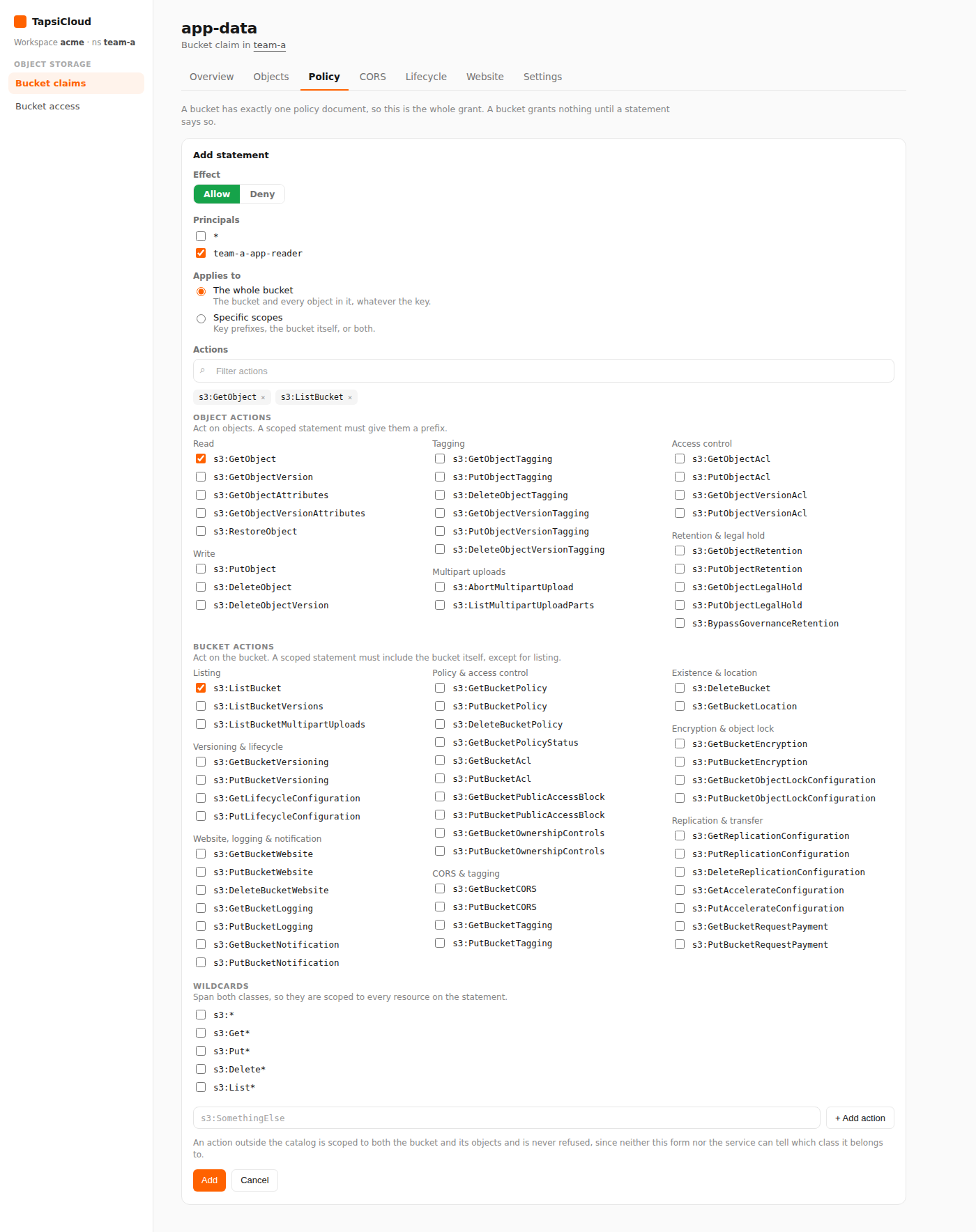
- Open your workspace, then open a namespace.
- In the namespace nav, under Object Storage, open Bucket claims.
- Open the claim.
- Select the Policy tab.
- Click Add statement and fill in:
- Effect —
AlloworDeny - Principals — allowed users; pick from users created by Bucket access in this namespace, or
*for public access - Applies to — the whole bucket and every object (default), or limit to a key prefix (for example
reports/) and/or the bucket itself - Actions — allowed operations, such as
s3:GetObjectands3:ListBucket
- Effect —
- Click Save.
For same-namespace access with keys, Bucket access is usually enough. Use the bucket policy for public access, or when you want to define grants explicitly on the bucket itself.
Edit or remove a statement
On the Policy tab you can edit or delete any statement. Removing the last statement clears the bucket policy, and nobody can reach the bucket through its policy again.
Set with kubectl
Set spec.bucketPolicy on the same S3BucketClaim:
❯ kubectl -n <namespace> apply -f - <<EOF❯ apiVersion: oss.tapsicloud.com/v1alpha1❯ kind: S3BucketClaim❯ metadata:❯ name: app-data❯ spec:❯ bucketPolicy:❯ statements:❯ - effect: Allow❯ principals: ["reader"]❯ actions: ["s3:GetObject", "s3:ListBucket"]❯ EOF
Replace <namespace> with your namespace. Assumes your workspace kubeconfig and context are already configured. reader must be an S3 user name (for example the one shown on a Bucket access status), not necessarily the access resource name.
Limit to a prefix
1apiVersion: oss.tapsicloud.com/v1alpha12kind: S3BucketClaim3metadata:4 name: app-data5spec:6 bucketPolicy:7 statements:8 - effect: Allow9 principals: ["reader"]10 actions: ["s3:GetObject", "s3:ListBucket"]11 resources:12 - prefix: "reports/"
Public read-only access
1apiVersion: oss.tapsicloud.com/v1alpha12kind: S3BucketClaim3metadata:4 name: app-data5spec:6 bucketPolicy:7 statements:8 - effect: Allow9 principals: ["*"]10 actions: ["s3:GetObject"]
Restrict to specific IPs
IP conditions are not available in the console statement form; use rawDocument (YAML / kubectl). Replace with your own IP or CIDR:
1apiVersion: oss.tapsicloud.com/v1alpha12kind: S3BucketClaim3metadata:4 name: app-data5spec:6 bucketPolicy:7 rawDocument: |8 {9 "Version": "2012-10-17",10 "Statement": [11 {12 "Effect": "Allow",13 "Principal": "*",14 "Action": ["s3:GetObject", "s3:ListBucket"],15 "Resource": [16 "arn:aws:s3:::app-data",17 "arn:aws:s3:::app-data/*"18 ],19 "Condition": {20 "IpAddress": {21 "aws:SourceIp": ["203.0.113.10/32", "198.51.100.0/24"]22 }23 }24 }25 ]26 }
The bucket name in Resource must match the claim name. With rawDocument, you cannot edit the same policy from the console statement form — change it again via the claim YAML.
Statement fields
| Field | In plain terms |
|---|---|
effect | Allow or Deny |
principals | S3 user name(s), or * for public |
actions | S3 operations such as s3:GetObject, s3:PutObject, s3:ListBucket |
resources (optional) | Omit = whole bucket and all objects; prefix = key scope; wholeBucket: true = the bucket itself |
A wrong principal name (for example the Bucket access name instead of the generated user name) may save without error but grant nothing. Use the name from the access status or the principals list in the console.
Clear the policy
To remove the policy entirely, clear bucketPolicy on the claim:
❯ kubectl -n <namespace> patch s3bucketclaim app-data --type=merge -p '{"spec":{"bucketPolicy":null}}'
CORS does not grant access; it only controls how browsers handle cross-origin responses. Real access comes from the bucket policy or Bucket access.