Create a bucket
A bucket is where you keep files and objects. To create one, create a bucket claim in a namespace — from the console or with kubectl.
Do not create from the workspace Buckets page. That view only lists existing workspace buckets. Creation always goes through Bucket claims in a namespace.
The claim name must be unique and cannot be changed later. If the name is already taken, creation fails.
Create from the console
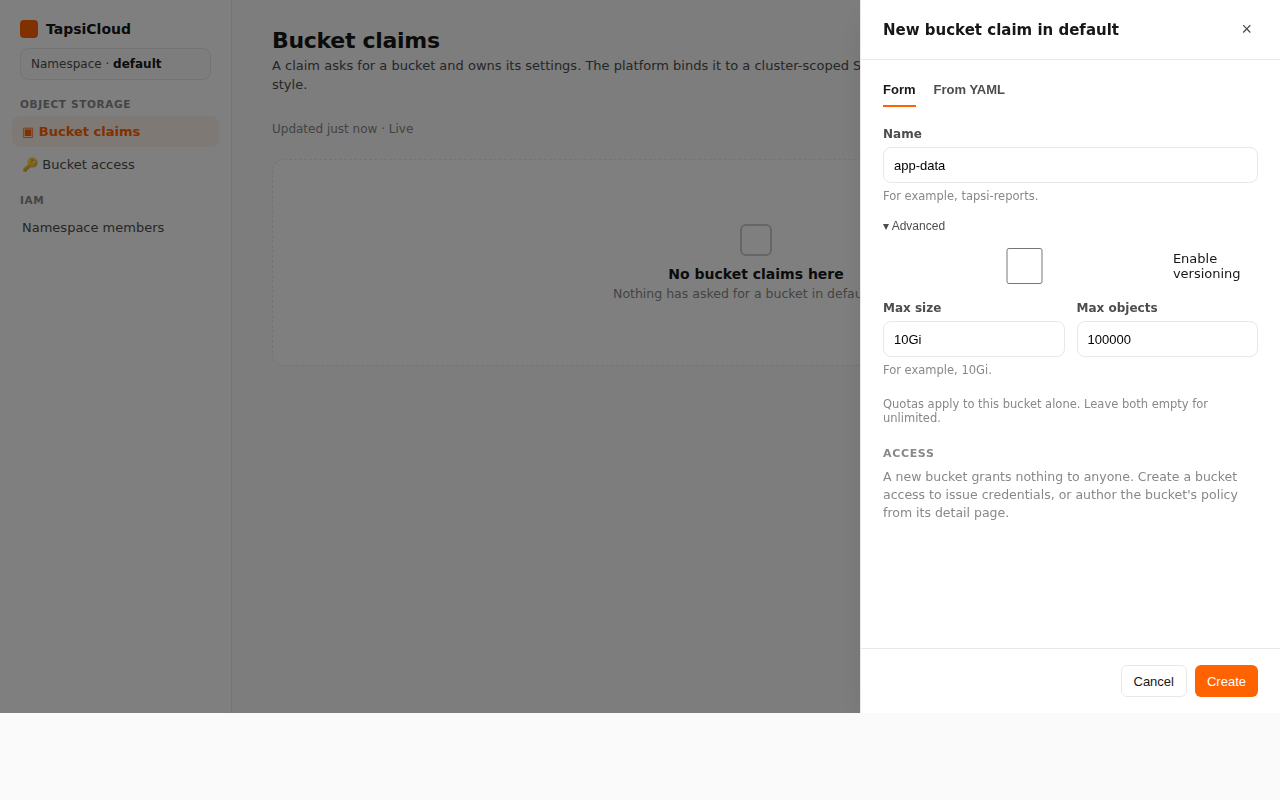
- Open your workspace, then open a namespace.
- In the namespace nav, under Object Storage, open Bucket claims.
- Click New bucket claim.
- In the panel, fill in Name (for example
app-data). - Optionally open Advanced:
- Enable versioning
- Max size (for example
10Gi) and Max objects
- Click Create.
- Wait until the claim status is Ready.
A new bucket grants access to nobody by itself. Use Bucket access for credentials, or set the bucket policy from the claim’s detail page.
Create with kubectl
Apply an S3BucketClaim in the namespace (not an S3Bucket):
❯ kubectl -n <namespace> apply -f - <<EOF❯ apiVersion: oss.tapsicloud.com/v1alpha1❯ kind: S3BucketClaim❯ metadata:❯ name: app-data❯ spec:❯ versioning: false❯ EOF
Replace <namespace> with your namespace. Assumes your workspace kubeconfig and context are already configured.
Check status:
❯ kubectl -n <namespace> get s3bucketclaims app-data
When Phase is Ready, the bucket is ready to use.
Optional settings
1apiVersion: oss.tapsicloud.com/v1alpha12kind: S3BucketClaim3metadata:4 name: app-data5spec:6 versioning: true7 deletionPolicy: Delete # Delete | Retain | DeleteWithContents8 quota:9 maxSize: 10Gi # Kubernetes quantity; omit for unlimited10 maxObjects: 100000
| Option | In plain terms |
|---|---|
versioning | Keep previous versions of objects |
quota.maxSize / quota.maxObjects | Cap total size or object count |
deletionPolicy: Delete | On claim delete, refuse if the bucket is not empty (default) |
deletionPolicy: Retain | Keep the bucket after the claim is removed |
deletionPolicy: DeleteWithContents | Delete all contents, then the bucket — irreversible |
In the console, versioning and quota are under Advanced. Changing deletionPolicy is usually done from the claim’s own page.
Do not upload or connect clients until the status is Ready.